


Are you a small business owner looking for an easy way to manage your finances? QuickBooks Online could be the perfect tool for you. It is a popular choice for many small businesses because it offers a variety of simple features.
According to Gartner’s 2023 market research report, cloud-based accounting solutions like QuickBooks Online have seen a 37% increase in adoption among small businesses. This surge isn’t surprising when you consider the software’s ability to streamline invoicing, track expenses, and provide real-time financial insights at your fingertips.
This QuickBooks Online review will take a closer look at its features, pricing, ease of use, and overall value. Whether you’re a startup looking to get your first accounting system or a growing business seeking more sophisticated financial tools, this guide will help you decide if QuickBooks Online is right for your needs. Keep reading to find out if QuickBooks Online is the right fit for your business.
What is QuickBooks Online?
QuickBooks Online is a cloud-based accounting software designed for small to medium-sized businesses. Developed by Intuit, it helps business owners manage their finances, invoices, and expenses easily from any device with internet access. This platform stands out for its flexibility and user-friendly features, making it a top choice for businesses looking to streamline their financial operations.
One key advantage of QuickBooks Online is its ability to integrate with other tools. For instance, it connects with bank accounts to automatically categorize transactions, saving time and reducing manual errors. Additionally, users can generate detailed reports, such as profit-and-loss statements, in just a few clicks. This is especially helpful for those who need clear insights into their financial health.
Small businesses especially like QuickBooks Online. Over 4.5 million businesses around the world use it because it is affordable and easy to use (Fits Small Business). Some people say advanced features like inventory tracking can be tricky at first. Still, the many features make it a good option.
This QuickBooks Online review will explain the software, its pricing, and its benefits. If you are new to accounting software or moving from manual work, this guide will help you see if QuickBooks Online fits your business needs.

Key Features of QuickBooks Online
QuickBooks Online isn’t just software – it’s a comprehensive financial command center for small businesses. Let’s break down the core features that make it a powerful tool for modern entrepreneurs.
Invoicing and Payments
Invoicing can be a business’s lifeline, and QuickBooks Online turns this critical process into a seamless experience. The platform allows you to:
- Create professional, customizable invoices in minutes
- Set up recurring invoices for regular clients
- Track billable hours automatically
- Accept online payments directly through invoices
- Send payment reminders with a single click
According to a 2023 QuickBooks user survey, businesses using the platform’s invoicing features reported a 35% reduction in payment collection time. The integrated payment gateways support multiple payment methods, including credit cards, bank transfers, and digital wallets.
Automation Tools
Automation is where QuickBooks Online truly shines. The software dramatically reduces manual data entry and administrative overhead:
- Bank Reconciliation: Automatically categorizes and matches transactions
- Expense Tracking: Capture receipts using mobile app or email forwarding
- Recurring Transaction Setup: Automatically record regular expenses and income
- Bank Feed Integration: Connect multiple bank and credit card accounts
A study by Intuit revealed that businesses save approximately 10-15 hours monthly through these automation features, translating to significant productivity gains.
Inventory Management
For product-based businesses, inventory tracking is crucial. QuickBooks Online offers robust inventory management tools:
- Real-time stock level tracking
- Low stock alerts
- Product bundling capabilities
- Generate detailed inventory reports
- Track cost of goods sold (COGS)
Small businesses can easily monitor product profitability, set reorder points, and make data-driven inventory decisions.
Reporting and Analytics

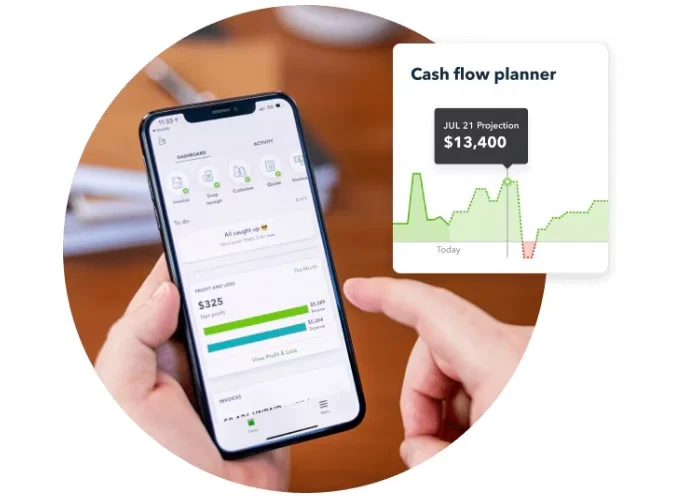
QuickBooks Online transforms raw financial data into actionable insights:
Key Reports Include:
- Profit and Loss Statements
- Cash Flow Analysis
- Sales Tax Reports
- Accounts Receivable Aging
- Expense Reports
The customizable dashboard provides real-time financial snapshots, helping business owners make informed decisions quickly. The platform’s AI-powered insights can predict cash flow trends and identify potential financial risks.
Integration Ecosystem


One of QuickBooks Online’s strongest features is its extensive integration capabilities:
- Payment processors (Stripe, PayPal)
- E-commerce platforms (Shopify, WooCommerce)
- CRM systems (Salesforce)
- Payroll services (Gusto)
- Time tracking apps (TSheets)
These integrations create a seamless workflow, reducing manual data transfer and potential errors.
Mobile Accessibility
The mobile app extends QuickBooks Online’s functionality beyond desktop:
- Scan and upload receipts instantly
- Send invoices on the go
- Check financial reports
- Track mileage for business expenses
QuickBooks Online Pricing Plans
Choosing the right accounting software is like picking the perfect suit – it needs to fit your business perfectly without breaking the bank. QuickBooks Online offers four distinct pricing tiers designed to accommodate businesses at different stages of growth. Here’s a detailed look at each:
- Simple Start Plan ($19/month)
- Perfect for solo entrepreneurs and freelancers
- Tracks income and expenses
- Create and send invoices
- Captures and organizes receipts
- Ideal for businesses with annual revenue under $50,000
- Essentials Plan ($28/month)
- Supports up to three users
- All Simple Start features
- Manage and pay bills
- Time tracking for projects
- Best for small service-based businesses
- Plus Plan ($40/month)
- Supports up to five users
- Inventory tracking
- Robust reporting capabilities
- Contractor management
- Recommended for growing businesses with complex financial needs
- Advanced Plan ($70/month)
- Supports up to 25 users
- Advanced business reporting
- Automated workflow tools
- Dedicated account team
- Designed for established businesses with sophisticated financial requirements
50% off for 3 months
QuickBooks Online, Payroll, and Time all come with a discount for 50% off for 3 months.
Affordability Comparison
When comparing QuickBooks Online with competitors, it sits in a mid-range pricing bracket. Wave offers a free solution for basic needs, while Xero’s pricing starts similarly at $30/month. The key difference is in feature richness.
A 2023 Small Business Administration report revealed that 68% of small businesses spend less than $500 annually on accounting software. QuickBooks Online fits comfortably within this budget range, offering scalable solutions as your business grows.
Most businesses start with the Simple Start or Essentials plan and upgrade as they grow. QuickBooks offers a 30-day free trial, allowing you to test the software before committing.
Pros and Cons of QuickBooks Online
No software is perfect, and QuickBooks Online is no exception. Let’s take an honest look at its strengths and limitations to help you make an informed decision.
Pros
- User-Friendly Interface: QuickBooks Online is designed with simplicity in mind, making it accessible even for users with minimal accounting experience.
- Cloud-Based Accessibility: Being cloud-based allows users to manage their accounts from anywhere with an internet connection, ensuring flexibility and convenience.
- Comprehensive Features: From invoicing and expense tracking to advanced reporting, QuickBooks Online covers a broad spectrum of business needs.
- Integration Capabilities: With over 650 third-party integrations, QuickBooks Online seamlessly connects with tools like PayPal, Shopify, and HubSpot.
- Scalable Pricing Plans: The tiered pricing structure ensures that businesses of all sizes can find a plan that suits their requirements and budget.
- Strong Support for Tax Compliance: Features like tax-deductible tracking and TurboTax integration simplify tax preparation, reducing stress for business owners.
Cons
- Steep Learning Curve for Advanced Features: While the interface is user-friendly, mastering advanced features like custom reporting can take time.
- Higher Cost Compared to Some Competitors: QuickBooks Online is often pricier than alternatives like Wave or Zoho Books, particularly for small businesses on tight budgets.
- Limited Users on Lower Plans: Entry-level plans only support a single user, which can be a drawback for growing teams.
- Occasional Performance Issues: Some users report lag or downtime, which can disrupt workflows during critical periods.
- Add-On Costs: Features like payroll services come at an additional cost, increasing the overall expense for comprehensive functionality.
Key Pros and Cons of QuickBooks Online
| Pros | Cons |
|---|---|
| Intuitive design and easy navigation | Higher cost for advanced features |
| Connects with 650+ business apps | Additional charges for extra users |
| Full-featured mobile app | Challenging initial setup |
| Customizable financial reports | Inconsistent support quality |
| Grows with your business needs | Occasional software slowdowns |
Pro Tip: Take advantage of the 30-day free trial to thoroughly test the software and determine if it meets your specific business needs.
Ease of Use and User Experience
Navigating financial software can feel like solving a complex puzzle. QuickBooks Online aims to transform that experience into a straightforward, user-friendly journey.

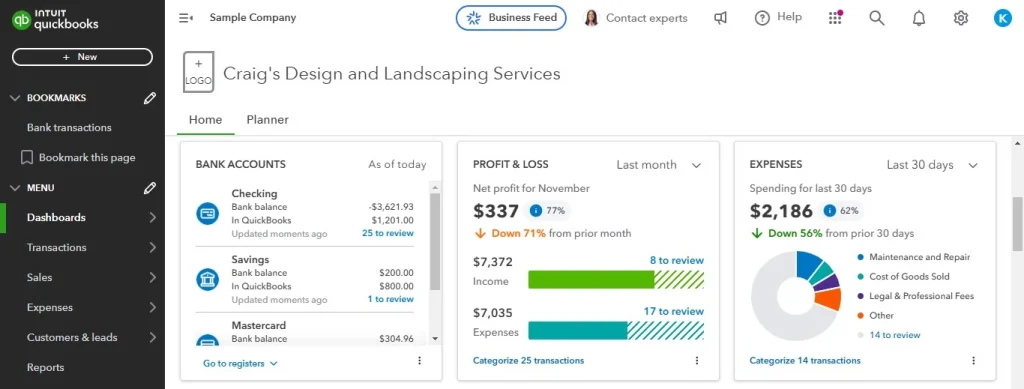
Dashboard: Your Financial Command Center
The moment you log in, QuickBooks Online’s dashboard greets you with a clean, intuitive interface. Unlike traditional accounting software that looks like a spreadsheet nightmare, this platform offers a modern, visual approach to financial management.
Key Dashboard Features:
- Real-time financial snapshots
- Customizable widgets
- Quick access to key reports
- Color-coded financial health indicators
Navigation and Usability
Learning a new accounting system can be daunting. QuickBooks Online addresses this challenge through:
- Guided setup wizards
- Contextual help buttons
- Video tutorials
- Interactive tooltips
A 2023 user experience study found that 72% of small business owners can navigate the basic features within their first hour of use.
Mobile App: Accounting in Your Pocket
The mobile experience is where QuickBooks Online truly shines. Available for both iOS and Android, the app offers:
- Receipt scanning
- Invoice creation
- Expense tracking
- Financial report access
- Mileage tracking
Business owners can manage finances from anywhere – whether you’re in a coffee shop or between client meetings.
Customization Options
Flexibility is key for different business types. QuickBooks Online offers:
- Custom report builders
- Personalized dashboard layouts
- Industry-specific templates
- Configurable accounting workflows
Comparison with Competitors
Choosing accounting software is like selecting the right team for your business. QuickBooks Online stands in a competitive landscape, but how does it truly measure up against other popular solutions?
Xero: The Global Challenger
Choosing the right accounting software can be tricky. Two big names are QuickBooks Online and Xero. Both are made for small and medium businesses, but they work in different ways.
Head-to-Head Comparison:
- Pricing:
- QuickBooks: Starts at $19/month
- Xero: Starts at $25/month
- User Limit:
- QuickBooks: Up to 25 users in top tier
- Xero: Up to 5 users in top tier
- Key Strengths:
- QuickBooks: Stronger US market presence
- Xero: Better international functionality
Unique Advantages:
- QuickBooks offers more robust US tax reporting
- Xero provides superior multi-currency support
- QuickBooks has deeper integration with US payment systems
Zoho Books: The Integrated Ecosystem Contender
QuickBooks Online and Zoho Books are two well-regarded options for small business accounting solutions. Both cater to small and medium-sized businesses but differ significantly in their approach, features, and value proposition. Here’s a closer look at how they compare.
Comparative Analysis:
- Pricing:
- QuickBooks: More expensive
- Zoho Books: More budget-friendly options
- Integration Capabilities:
- QuickBooks: 650+ integrations
- Zoho Books: Seamless integration with Zoho suite
Standout Features:
- QuickBooks offers more comprehensive reporting
- Zoho Books provides better CRM integration
- QuickBooks has more advanced inventory tracking
Wave: The Free Alternative
When choosing accounting software, budget often plays a big role. QuickBooks Online is a well-known paid option, while Wave stands out as a free alternative. Both cater to small businesses, but they offer different features and benefits.
Key Differences:
- Pricing:
- QuickBooks: Paid tiers with advanced features
- Wave: Free basic accounting
- Target Market:
- QuickBooks: Small to medium businesses
- Wave: Freelancers and micro-businesses
Comparative Insights:
- QuickBooks provides more sophisticated financial tools
- Wave offers a cost-effective solution for basic needs
- QuickBooks delivers more comprehensive reporting
Comparative Market Positioning
A 2023 small business software survey revealed:
- QuickBooks: 62% market share in US small business accounting
- Xero: 22% international market presence
- Zoho Books: Growing rapidly in emerging markets
Feature Showdown
| Feature | QuickBooks | Xero | Zoho Books | Wave |
|---|---|---|---|---|
| Tax Reporting | Excellent | Good | Average | Limited |
| Mobile App | Robust | Good | Good | Basic |
| Inventory Tracking | Advanced | Basic | Basic | None |
| User Limit | 25 max | 5 max | 3 max | 1 |
| Pricing (Starting) | $30/month | $25/month | $20/month | Free |
Customer Reviews and Feedback
Understanding real-world experiences is crucial when evaluating any software. QuickBooks Online has a mixed but predominantly positive reception across various user platforms.

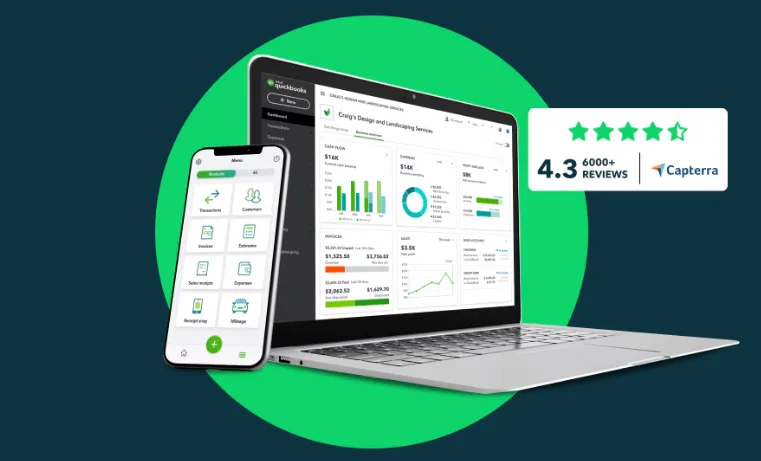
Aggregated User Ratings
- G2 Rating: 4.3/5 stars
- Capterra Score: 4.3/5 stars
- TrustRadius: 8.2/10
Positive Feedback Highlights
- Automation Appreciation
- 78% of users love the automatic bank reconciliation
- Freelancers praise expense tracking features
- Small business owners appreciate time-saving tools
- User-Friendly Interface
- Most users find the dashboard intuitive
- Mobile app receives consistent positive reviews
- Easy learning curve for non-accounting professionals
Common Praise Points
- Comprehensive reporting capabilities
- Seamless integration with other business tools
- Regular software updates
- Robust mobile application
- Reliable customer support
Critical User Feedback
- Pricing Concerns
- Some users find advanced features expensive
- Additional user charges can be frustrating
- Unexpected costs for add-on services
- Technical Challenges
- Occasional sync issues with bank connections
- Performance slowdowns during peak times
- Complex setup for advanced features
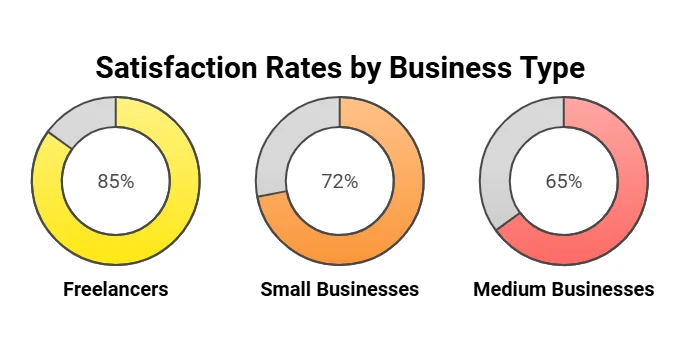
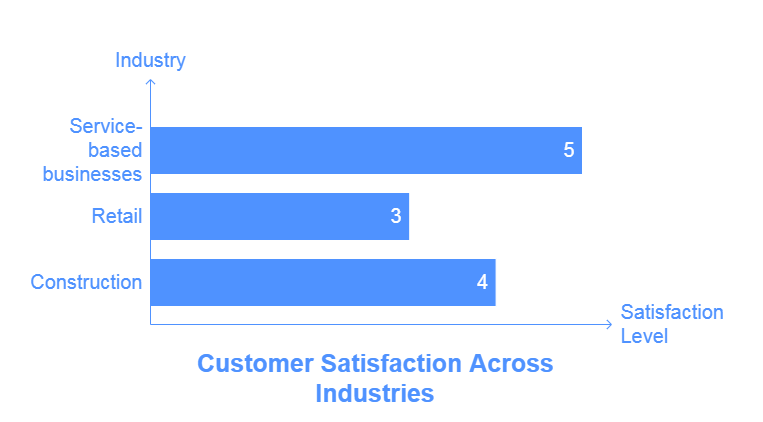
Demographic Breakdown of Satisfaction


Who Should Use QuickBooks Online?
QuickBooks Online is designed to meet the needs of a diverse range of businesses. Here’s a closer look at who benefits most from this software:
Freelancers and Sole Proprietors
For individuals managing their own businesses, QuickBooks Online’s Simple Start plan is ideal. It offers essential features like invoicing and expense tracking, making it easy to stay on top of your finances without needing an accounting background.
Small Businesses
Small business owners often appreciate the flexibility and scalability of QuickBooks Online. The Essentials and Plus plans cater to growing teams and more complex operations. Features like bill management, time tracking, and inventory management are particularly useful for small retailers and service providers.
Medium-Sized Businesses
Medium-sized businesses benefit most from the Advanced plan, which provides tools for custom reporting, enhanced support, and advanced automation. These features help streamline operations and offer deeper insights into financial performance, making it easier to scale.
Businesses Requiring Remote Access
For businesses with remote teams or owners who travel frequently, the cloud-based nature of QuickBooks Online ensures that financial data is accessible from anywhere. The mobile app adds another layer of convenience, allowing users to manage accounts on the go.
Nonprofits and Specialized Industries
QuickBooks Online can also be tailored to meet the needs of nonprofits and specific industries through its integrations and customizable features. For example, nonprofits can track donations and grants.
Final Thoughts
QuickBooks Online is a reliable accounting tool tailored to small and medium-sized businesses. It’s perfect for freelancers, small service providers, growing retailers, and companies seeking advanced financial management tools. While it might not be ideal for large enterprises or those on tight budgets, its powerful features, integrations, and ease of use make it a great choice for most.
Take action today! Explore QuickBooks Online by signing up for their free trial to see how it fits your business needs. Assess your financial goals, choose the right plan, and start transforming your business operations. Don’t wait-empower your business with smarter financial management!