

Using QuickBooks for personal finance helps streamline budgeting and track expenses efficiently. It offers robust tools for financial management.
QuickBooks is a powerful software designed for financial management. It allows individuals to monitor expenses, create budgets, and generate financial reports. Using QuickBooks, you can categorize transactions, set financial goals, and stay organized. The software supports linking bank accounts for real-time updates.
It also provides insights into spending patterns, helping you make informed financial decisions. QuickBooks simplifies tax preparation by organizing expenses and income. The user-friendly interface makes it accessible for beginners. Overall, QuickBooks enhances personal financial management by offering comprehensive tools and features. It is a reliable choice for anyone looking to improve their financial health.
Getting Started with Quickbooks
Managing personal finances can be a daunting task. QuickBooks makes it easier by providing powerful tools that simplify tracking income, expenses, and budgets. This guide will help you get started with QuickBooks for personal finance, ensuring you make the most out of its features.
Choosing The Right Quickbooks Product
QuickBooks offers various products tailored to different needs. It is essential to choose the one that fits your personal finance goals.
QuickBooks Online is ideal for those who need access from multiple devices. It offers features such as:
- Automatic bank transaction downloads
- Expense tracking
- Budgeting tools
QuickBooks Desktop is suitable if you prefer working offline. It provides robust features like:
- Advanced reporting
- Inventory tracking
- Customizable invoices
QuickBooks Self-Employed targets freelancers and independent contractors. It includes:
- Mileage tracking
- Quarterly tax estimation
- Expense categorization
Choosing the right product ensures you have the necessary tools to manage your finances effectively.
Setting Up Your Quickbooks Account
Setting up your QuickBooks account is a straightforward process that ensures accurate tracking of your finances. Follow these steps to get started:
Create an Account: Sign up for a QuickBooks account using your email. Choose a strong password to secure your information.
Connect Your Bank Accounts: Link your bank accounts to QuickBooks for automatic transaction downloads. This feature saves time and ensures accuracy.
Customize Categories: Set up categories that reflect your spending habits. This helps in better tracking and analysis of your expenses.
Set Financial Goals: Define your financial goals within QuickBooks. This feature helps you stay focused and track your progress.
Regular Updates: Regularly update your transactions and review your financial reports. This habit ensures you stay on top of your finances.
Following these steps ensures a smooth setup, allowing you to make the most out of QuickBooks for managing your personal finances.
Tracking Income and Expenses
QuickBooks is a fantastic tool for managing personal finances. It helps you track income and expenses with ease. Many people use it to stay on top of their financial health. This blog post will guide you through the process. You will learn how to connect bank and credit card accounts. You will also learn how to categorize transactions.
Connecting Bank and Credit Card Accounts
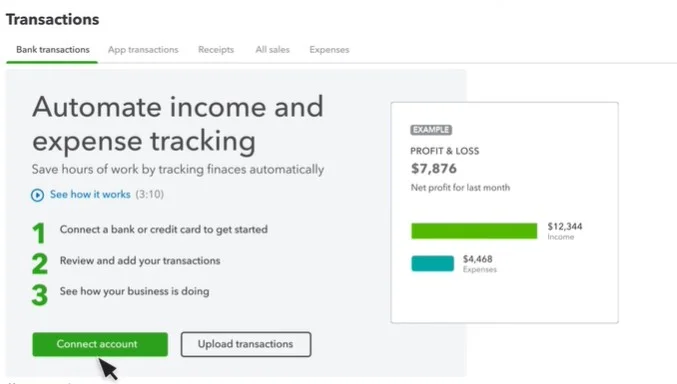
Connecting your bank and credit card accounts is the first step. This allows QuickBooks to pull in your transactions. Follow these steps to connect your accounts:
- Open QuickBooks and go to the Banking section.
- Click on “Add Account.”
- Type in the name of your bank or credit card company.
- Enter your login details for the bank or credit card account.
- QuickBooks will connect and pull in your transactions.
Having your accounts connected makes tracking easier. You will not have to enter transactions manually. This saves time and reduces errors.
Another benefit is that you can see all your accounts in one place. This gives you a full picture of your finances. It helps in making informed financial decisions.
Categorizing Transactions
Once your transactions are in QuickBooks, you need to categorize them. This helps you understand where your money is going. Follow these steps to categorize transactions:
- Go to the Banking section in QuickBooks.
- Click on “For Review.”
- Select a transaction to categorize.
- Choose a category from the drop-down menu.
- Click “Add” to save the category.
QuickBooks learns from your choices. Over time, it will suggest categories for new transactions. This makes the process faster and more accurate.
Proper categorization helps in generating useful reports. You can see your spending habits and find areas to save money. It also makes tax time easier. You will have all your expenses sorted and ready to go.
Budgeting and Financial Planning
Managing personal finance can be a challenge for many. QuickBooks offers tools that make budgeting and financial planning simple. This software helps you track expenses, set budgets, and generate reports. With the right approach, QuickBooks can transform your financial habits.
Creating a Budget in Quickbooks
Creating a budget in QuickBooks is easy and efficient. Start by listing all your income sources. This includes your salary, side jobs, and any other income. Then, list your monthly expenses. Include rent, utilities, groceries, and other bills.
Once you have all your numbers, enter them into QuickBooks. The software will help you categorize each expense. Categories might include housing, food, transportation, and entertainment. QuickBooks offers templates that make this process faster.
Here’s a simple budget template you can use:
| Category | Amount |
|---|---|
| Housing | $1000 |
| Food | $300 |
| Transportation | $150 |
| Entertainment | $100 |
Review your budget regularly. Adjust it as your income or expenses change. QuickBooks will also alert you if you overspend in any category. This helps you stay on track and save money.
Read More: How 70/20/10 Budget Rule Works
Generating Financial Reports
Generating financial reports with QuickBooks is straightforward. These reports give you insights into your spending habits. You can see where your money goes each month. This helps in making better financial decisions.
To generate a report, go to the Reports tab in QuickBooks. Choose the type of report you need. Common reports include income statements, expense reports, and balance sheets. These reports are customizable. You can filter them by date, category, or amount.
Here are some key reports you might find useful:
- Income Statement: Shows your total income and expenses over a period.
- Expense Report: Breaks down your spending by category.
- Balance Sheet: Summarizes your assets, liabilities, and net worth.
Review these reports monthly. They help you understand your financial health. You can identify areas where you can cut costs. This allows you to save more money and achieve your financial goals.
Managing Investments and Assets
Managing personal finances can be daunting, but QuickBooks offers a streamlined solution. This software isn’t just for businesses; it’s perfect for individuals too. With QuickBooks, tracking investments and managing assets becomes simple and efficient. Let’s dive into how you can use QuickBooks to handle your investments and assets effectively.
Tracking Investments and Portfolio Performance

QuickBooks makes tracking your investments easy. You can monitor your investment accounts and see how they perform. By linking your bank and brokerage accounts, you get real-time updates. This helps you make better financial decisions. Here are some steps to follow:
- Link your accounts: Connect your bank and brokerage accounts to QuickBooks.
- Track performance: Use the dashboard to see how your investments are doing.
- Generate reports: Create reports to analyze your investment performance over time.
QuickBooks also lets you categorize your investments. You can separate stocks, bonds, and mutual funds. This helps in understanding where your money is going. You can also set up alerts for significant changes in your portfolio. This way, you stay updated without constantly checking your accounts.
Recording and Depreciating Assets
QuickBooks helps you record and depreciate assets efficiently. This is crucial for understanding your net worth. Start by adding your assets to the system. These can include property, vehicles, and other valuable items. Here’s how you can do it:
- Add new assets: Go to the ‘Assets’ section and click ‘Add New.’
- Fill in details: Enter the purchase price, date, and other relevant information.
- Set depreciation: Choose a depreciation method and set it up.
QuickBooks calculates depreciation automatically. This means you get an accurate value of your assets over time. You can also generate depreciation reports. These reports help in tax planning and financial analysis. Below is a sample table of how QuickBooks might display asset depreciation:
| Asset | Purchase Price | Depreciation Method | Current Value |
|---|---|---|---|
| Car | $20,000 | Straight Line | $15,000 |
| Laptop | $1,000 | Double Declining | $600 |
With these tools, managing your assets becomes straightforward. QuickBooks provides a complete view of your financial health.
Tax Planning And Reporting
Managing personal finances can be a daunting task. QuickBooks offers a powerful solution for tax planning and reporting. With its user-friendly features, it helps you stay organized and prepared for tax season. This guide will explore how to use QuickBooks for effective tax planning and reporting.
Preparing for Tax Season
Tax season can be stressful. QuickBooks can ease this burden. Start by organizing all your financial records. QuickBooks allows you to categorize expenses and income. This makes it easier to find information when needed.
Follow these steps to prepare for tax season:
- Gather all financial documents: Collect receipts, bank statements, and invoices.
- Update your QuickBooks records: Ensure all transactions are entered and categorized.
- Reconcile accounts: Match your QuickBooks records with bank statements.
- Review income and expenses: Check for accuracy and completeness.
Using QuickBooks, you can also set up reminders for important tax deadlines. This ensures you never miss a date. Staying ahead of tax season helps reduce stress and avoid penalties.
Generating Tax Reports in Quickbooks
QuickBooks makes it easy to generate tax reports. These reports help you understand your financial situation. They also provide the necessary information for tax filing.
Common tax reports you can generate include:
- Profit and Loss Report: Shows your total income and expenses.
- Balance Sheet Report: Provides a snapshot of your assets and liabilities.
- Tax Summary Report: Summarizes your taxable income and deductions.
To generate these reports in QuickBooks, follow these steps:
- Go to the Reports section in QuickBooks.
- Select the report you need from the list.
- Customize the report by selecting the date range and other filters.
- Click “Run Report” to generate and view the report.
These reports can be exported to Excel or PDF for easy sharing. Having detailed tax reports helps you file your taxes accurately and on time.
Utilizing Quickbooks Mobile App
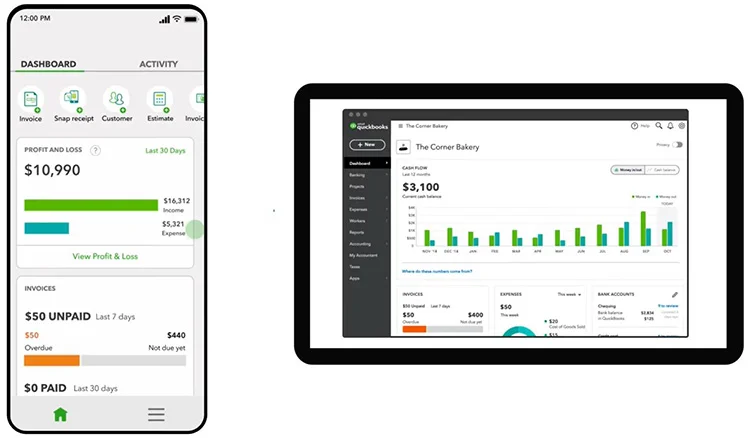
QuickBooks is a powerful tool for managing personal finances. It simplifies tracking expenses, income, and budgeting. With its mobile app, users can manage their finances anywhere. The app provides flexibility and convenience, making personal finance management easier than ever before.
Managing Finances on the Go
The QuickBooks Mobile App is a game-changer for busy individuals. It allows users to keep track of their finances while on the move. This feature is especially useful for people with hectic schedules. With the app, users can:
- Track expenses by capturing receipts using the phone’s camera.
- Monitor income by syncing bank accounts and credit cards.
- Create and manage budgets to ensure spending stays within limits.
Imagine being able to check your financial status during a lunch break. The app provides real-time updates, ensuring you always know where you stand. This can help prevent overspending and stay on top of bills.
For those who travel frequently, the QuickBooks Mobile App ensures you never lose sight of your finances. Whether waiting in an airport or on a train, you can manage your money efficiently. The convenience of having all financial information in your pocket cannot be overstated.
Features and Limitations of the Mobile App
The QuickBooks Mobile App comes with numerous features. Some of the most notable include:
- Expense tracking: Capture and categorize expenses with ease.
- Income tracking: Sync accounts to track deposits and payments.
- Budgeting tools: Set and manage budgets efficiently.
- Real-time updates: Get instant insights into financial status.
Despite these powerful features, the app has some limitations. One limitation is the screen size, which can make viewing detailed reports challenging. Another is that some advanced features available on the desktop version are not present in the mobile app. This can be a drawback for users who need advanced financial analysis tools.
Additionally, the mobile app requires an internet connection for syncing data. This can be an issue in areas with poor connectivity. Despite these limitations, the app remains a valuable tool for managing personal finances on the go.
Advanced Tips and Tricks
Using QuickBooks for personal finance can simplify money management. This software is not just for businesses. It also helps individuals keep track of their finances. With advanced tips and tricks, QuickBooks becomes even more powerful. Let’s dive into some of these tips to make the most of QuickBooks for personal finance.
Automating Recurring Transactions
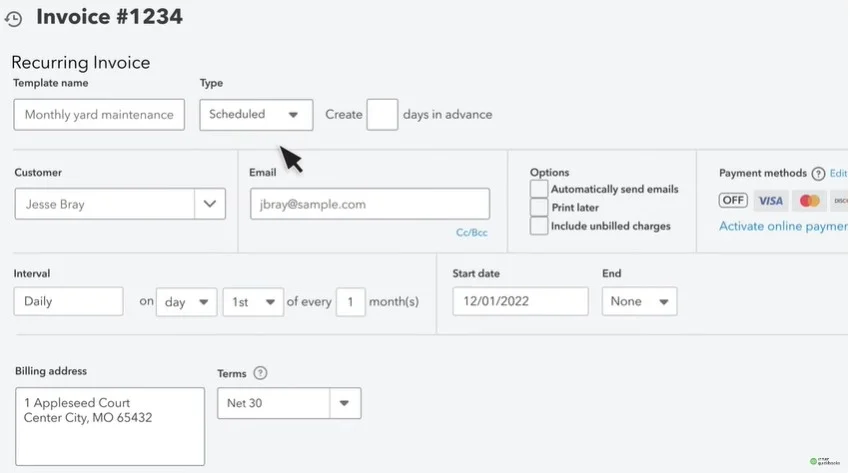
Setting up recurring transactions saves time. It ensures you never miss a payment. To automate transactions in QuickBooks, follow these steps:
- Go to the Gear icon and select Recurring Transactions.
- Click on New to create a new template.
- Choose the type of transaction: Invoice, Expense, or others.
- Fill in the necessary details like amount, frequency, and start date.
- Save the template.
QuickBooks will now handle these transactions automatically. This feature is especially useful for:
- Monthly bills like rent or utilities.
- Regular savings contributions.
- Subscription services.
Automating recurring transactions reduces manual work. It also helps in keeping your finances organized. You can review these automated entries anytime. Just go to the Recurring Transactions section.
Customizing Quickbooks for Personal Finance
QuickBooks can be tailored to fit personal finance needs. Customizing the software makes it more user-friendly. Here’s how you can customize QuickBooks:
- Go to the Chart of Accounts to categorize your expenses and income.
- Create new categories that suit your personal finance needs.
- Use the Budgeting tool to set financial goals.
- Customize reports to get insights into your spending habits.
Personalizing your dashboard is also beneficial. You can add widgets that show:
- Your bank account balances.
- Upcoming bills and due dates.
- Spending summaries.
Customizing QuickBooks helps you stay on top of your finances. It makes monitoring your financial health easier. Tailor the software to meet your unique needs. This ensures you get the most out of QuickBooks for personal finance.
Frequently Asked Questions
Can I use QuickBooks for personal finances?
Yes, QuickBooks can be used for personal finances. It helps you track expenses, set budgets, and manage your money efficiently.
Does QuickBooks work for personal finances?
Yes, QuickBooks works well for personal finances. It provides tools to organize your income, expenses, and financial goals.
Is QuickBooks good for personal finances?
QuickBooks is great for personal finances. It offers features like transaction tracking, budgeting, and financial reporting to keep you organized.
Is there a simple version of QuickBooks for personal finances?
Yes, QuickBooks has user-friendly options like QuickBooks Simple Start, which is perfect for managing personal finances with basic features.
Which is better for personal finances, Quicken or QuickBooks?
Quicken is often better for personal finances, as it’s designed specifically for personal budgeting. However, QuickBooks is a great option if you also manage a small business.
Final Words
QuickBooks simplifies managing personal finances. It offers powerful tools for budgeting, tracking expenses, and financial planning. Embrace its features to gain better control over your money. Start using QuickBooks today for a streamlined and efficient approach to your personal finance management.
Taking this step can lead to improved financial health and peace of mind.

Leave a Reply