


Running a business is no small task, especially for freelancers and small business owners. Wave Accounting reviews show how it makes tracking your income and expenses easy.
Wave is a free, cloud-based accounting software that makes handling finances simpler. Whether you’re creating invoices, scanning receipts, or tracking your expenses, Wave does it all in one place. It’s trusted by over 2 million users globally, according to Wave’s official statistics. Launched in 2009 and later acquired by H&R Block in 2019, Wave has become a favorite among small business owners for its affordability and ease of use.
In this article, we’ll explore Wave Accounting review, what users love, its drawbacks, and how it compares to competitors like QuickBooks and Xero. Wave Accounting claims to simplify small business finances. Ready to find out?
Key Features of Wave Accounting

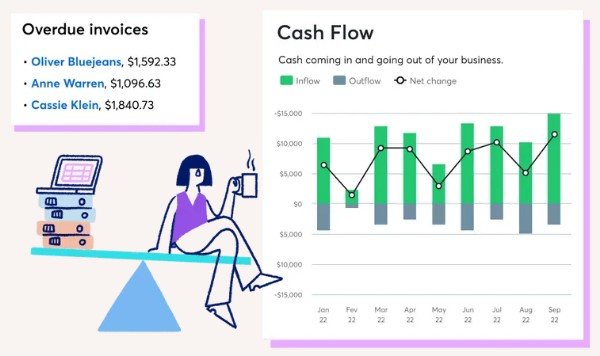
Wave Accounting isn’t just free—it’s packed with features designed for freelancers and small businesses. Here’s a closer look at the tools that make Wave stand out:
1. Professional Invoicing
Wave lets you create and send unlimited invoices for free. You can customize them with your logo, colors, and details to look professional. Customers can even pay directly from the invoice using Wave’s payment processing option (credit card and bank payments). While payments come with a small fee (around 2.9% + $0.30 per transaction in the U.S.), the convenience makes it worthwhile for many.
2. Expense Tracking
Do you hate manually entering expenses? With Wave, you can link your bank account to automatically track and categorize transactions. This feature not only saves time but also ensures that you never miss an important business expense.
3. Receipt Scanning
Wave’s mobile app allows you to snap a photo of your receipts. The app organizes them for you and adds them to your expenses. This is a lifesaver for small businesses juggling multiple purchases.
4. Reporting Tools
Wave’s reporting feature provides essential financial insights. You can generate profit and loss statements, cash flow reports, and sales tax summaries—all with a few clicks. These reports help you understand where your business stands financially.
5. Multi-Business Management
If you run more than one business, you can manage them under one Wave account. This is a unique feature not all competitors offer, saving you from the hassle of switching platforms.
Why it Matters:
Features like these explain why Wave Accounting reviews are often positive. It’s free, easy to use, and helps business owners save time and stress. For startups, that’s priceless.

Pricing Structure
One of the biggest reasons for Wave’s popularity is its free pricing model. Unlike many competitors, Wave doesn’t charge a monthly subscription fee for its core services. Let’s break it down:
Free Features
Wave offers essential tools like invoicing, expense tracking, receipt scanning, and financial reporting—completely free. This makes it a great choice for small businesses, especially those operating on tight budgets.
Paid Add-ons
While the core features are free, Wave generates revenue through optional paid services:
- Payment Processing: Wave charges a small fee when customers pay invoices online. For credit card payments, it’s 2.9% + $0.60 per transaction in the U.S. Bank payments (ACH) are cheaper at 1% per transaction.
- Payroll Services: For businesses in the U.S. and Canada, Wave offers payroll services starting at $20–$35/month, plus $6 per employee. This service includes tax filings and direct deposit.
Why It’s Affordable
Wave’s free model gives small business owners access to high-quality tools without spending a fortune. Many competitors, like QuickBooks and FreshBooks, charge monthly fees starting at $15–$25.
Pros & Cons
Here is the breakdown of the pros and cons of Wave Accounting to help you decide if it’s the right tool for your business.
Pros
Wave Accounting stands out for several reasons. Its features, accessibility, and cost make it a favorite among small businesses and freelancers. Let’s look at the key benefits:
1. Completely Free Core Features
Unlike most competitors, Wave offers invoicing, receipt scanning, expense tracking, and financial reporting at no cost. This makes it especially valuable for startups and small businesses with limited budgets.
2. User-Friendly Interface
Wave’s clean, intuitive design is easy to navigate—even for people with no accounting background. Business owners can manage finances without needing to hire an accountant. This simplicity often gets praise in Wave Accounting reviews.
3. Cloud-Based Accessibility
Because it’s cloud-based, you can access Wave from anywhere with an internet connection. This is ideal for business owners who are always on the go. Wave also offers mobile apps for managing invoices and receipts.
4. Unlimited Usage
There’s no cap on the number of invoices you can send or expenses you can track. Many competitors, like QuickBooks and FreshBooks, limit these features in their lower-tier plans.
5. Multi-Business Support
If you run multiple businesses, Wave lets you manage them all under one account. This is a huge time-saver for entrepreneurs juggling multiple ventures.
Cons and Limitations
While Wave Accounting offers impressive features for free, it’s not perfect. Like any software, it has some drawbacks you need to consider.
1. Limited Customer Support
Wave doesn’t provide live phone support unless you’re using their paid services like payroll. Free users only have access to a self-help knowledge base and email support. For urgent issues, this can be frustrating. Many negative Wave Accounting reviews mention this limitation.
2. Lack of Advanced Features
Wave is best for small businesses and freelancers. However, it lacks advanced tools like time tracking, inventory management, or project management. Businesses with more complex needs might find Wave insufficient and may need to look at options like QuickBooks or Xero.
3. Not Ideal for Larger Businesses
As your business grows, you might outgrow Wave’s capabilities. Larger businesses often require more robust reporting and automation features that Wave doesn’t offer.
4. Payroll Services Are Limited by Location
Wave’s payroll feature is only available in the U.S. and Canada. This can be a dealbreaker for businesses operating internationally.
5. No Offline Access
Since Wave is entirely cloud-based, you’ll need an internet connection to use it. This might be inconvenient for users in areas with poor connectivity.
User Feedback and Ratings
When choosing accounting software, real-world user experiences often tell the true story. Wave Accounting has received a mix of praise and criticism across various platforms. Let’s explore what users have to say:
Positive Feedback
Many small business owners and freelancers rave about Wave’s affordability and simplicity.
- On Capterra, Wave holds a 4.4/5 rating, with users highlighting its free core features, user-friendly interface, and professional invoicing tools.
- According to a user on TrustRadius, “Wave has everything I need to keep my small business finances in order, and I don’t pay a dime for the core features.”
Several users also appreciate how Wave saves time with its automated expense tracking and receipt scanning. The ability to manage multiple businesses from one account is another standout feature frequently mentioned.
Criticism and Negative Feedback
However, Wave is not without its flaws.
- A common complaint is the lack of live customer support, especially during urgent technical issues.
- On G2, where Wave has a 4.1/5 rating, some users pointed out its limited scalability. One reviewer mentioned, “Wave is great when you’re starting out, but as my business grew, I needed something with more advanced features.”
- Another concern is its limited payroll functionality, which is only available in the U.S. and Canada.
What This Means for You
Wave is a fantastic choice for small businesses, freelancers, and solopreneurs who need basic accounting tools without the price tag. However, if your business is growing rapidly or requires advanced features, you might need to consider alternatives like QuickBooks or Xero.
Wave’s reviews reflect its strengths as a cost-effective, user-friendly solution for businesses just getting started.
Comparison with Competitors
Wave Accounting is a strong contender in the world of accounting software, but how does it compare to its competitors like QuickBooks, FreshBooks, and Xero? Let’s break it down:
Wave Accounting vs. QuickBooks
- Pricing: Wave’s core features are free, while QuickBooks’ plans start at $15/month. For small businesses on a budget, Wave wins hands down.
- Features: QuickBooks offers advanced tools like inventory tracking, time tracking, and extensive integrations, making it better for growing businesses.
- Ease of Use: Wave is simpler and better for users with no accounting experience, while QuickBooks may feel overwhelming for beginners.
Verdict: Choose Wave if you’re starting out and need something free; go for QuickBooks if you’re scaling up and need more advanced features.
Wave vs QuickBooks: A Comprehensive Comparison
Wave Accounting vs. FreshBooks
- Invoicing: Both platforms excel in invoicing, but FreshBooks offers time-tracking features, making it ideal for service-based businesses.
- Pricing: FreshBooks starts at $17/month, while Wave remains free.
- Integrations: FreshBooks integrates with more apps, but Wave provides the basics most small businesses need.
Verdict: FreshBooks is better for freelancers who bill by the hour, while Wave is perfect for those who need free tools.
Wave Accounting vs. Xero
- Reporting: Xero offers more detailed financial reports and better scalability, which is great for mid-sized businesses.
- Pricing: Xero’s plans start at $13/month, but its features are geared toward businesses with more complex needs.
- Accessibility: Both are cloud-based, but Xero supports offline backups, which Wave doesn’t.
Verdict: Xero is ideal for businesses needing scalability and advanced reporting; Wave is the go-to for simplicity and affordability.
Frequently Asked Questions
Is Wave Accounting really free?
Yes, Wave Accounting offers a free plan with unlimited invoicing, receipt scanning, and expense tracking. However, there are fees for payment processing and payroll services.
Can I use Wave Accounting for multiple businesses?
Yes, you can manage multiple businesses under one account, which is a common highlight in positive Wave Accounting reviews.
What are the main drawbacks of Wave Accounting?
Some limitations include lack of live customer support, no time tracking, and fewer integrations compared to competitors like QuickBooks and FreshBooks.
Does Wave Accounting work offline?
No, it is a cloud-based software, so an internet connection is required to access your data.
How does Wave Accounting compare to QuickBooks?
Wave Accounting is ideal for small businesses seeking a free solution, while QuickBooks offers more advanced tools for scaling businesses.
Is Wave safe to use for financial data?
Yes, Wave prioritizes security. The platform uses 256-bit encryption to protect your data and follows industry-standard security practices. Your information is safe and only accessible to authorized users.
Can Wave handle tax calculations?
Yes, Wave simplifies tax management by automatically categorizing transactions and generating tax reports. However, it doesn’t support automatic tax filing.
What countries does Wave’s payroll feature support?
Wave’s payroll service is only available in the U.S. and Canada. For businesses outside these regions, this feature won’t be usable.
Can Wave integrate with other tools?
Wave supports basic integrations, like connecting with your bank for transaction tracking. However, it doesn’t offer as many integrations as competitors like FreshBooks or Xero.
Is Wave good for startups?
Yes, Wave is perfect for startups and small businesses. Its free features cover the basics, helping you manage finances without any upfront costs.
Final Thoughts
Wave Accounting is an excellent choice for freelancers, solopreneurs, and small business that need reliable accounting tools without high costs. Its free core features such as invoicing, expense tracking, and receipt scanning make it a top choice for budget seekers.
However, Wave isn’t perfect. It lacks advanced features like inventory management and is less scalable for growing businesses. Additionally, customer support for free users is limited, which can be a drawback for some.
Still, if you’re starting or running a small business with simple financial needs, Wave is a solid deal. Many Wave Accounting reviews highlight its ease of use, low cost, and ability to simplify bookkeeping. Ultimately, the decision depends on your business size, needs, and budget. If you want to tidy up your finances, try Wave-it could be the tool you need.